
КАТЕГОРИИ:
Архитектура-(3434)Астрономия-(809)Биология-(7483)Биотехнологии-(1457)Военное дело-(14632)Высокие технологии-(1363)География-(913)Геология-(1438)Государство-(451)Демография-(1065)Дом-(47672)Журналистика и СМИ-(912)Изобретательство-(14524)Иностранные языки-(4268)Информатика-(17799)Искусство-(1338)История-(13644)Компьютеры-(11121)Косметика-(55)Кулинария-(373)Культура-(8427)Лингвистика-(374)Литература-(1642)Маркетинг-(23702)Математика-(16968)Машиностроение-(1700)Медицина-(12668)Менеджмент-(24684)Механика-(15423)Науковедение-(506)Образование-(11852)Охрана труда-(3308)Педагогика-(5571)Полиграфия-(1312)Политика-(7869)Право-(5454)Приборостроение-(1369)Программирование-(2801)Производство-(97182)Промышленность-(8706)Психология-(18388)Религия-(3217)Связь-(10668)Сельское хозяйство-(299)Социология-(6455)Спорт-(42831)Строительство-(4793)Торговля-(5050)Транспорт-(2929)Туризм-(1568)Физика-(3942)Философия-(17015)Финансы-(26596)Химия-(22929)Экология-(12095)Экономика-(9961)Электроника-(8441)Электротехника-(4623)Энергетика-(12629)Юриспруденция-(1492)Ядерная техника-(1748)
What kind of cable connection?
|
|
|
|
| Serial cable | Sends data only 1 bit at a time Printer can be up to 1000 feet away from the computer. Maximum data transfer speed = 115 kilobits/s (.115Mbits/s) | 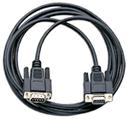
|
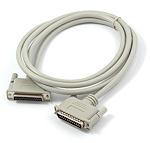
| Parallel cable | Old type:Sends data 8 bits at a time Printer must be within 50 feet of the computer.
Maximum data transfer speed: 115 kilobytes/s (.115MBYTES/s). This is 8 times faster than the maximum serial speed.
Newer printers may need bi-directional cable so that the printer can talk back to the computer. Such a cable is required if the printer can give helpful error messages. It's startling, but nice, the first time your computer politely says "Ink is getting low" or "Please place paper in the AutoSheet feeder."
  Oddly, Windows XP does not support spooling for a parallel connection to a printer. Spooling is what allows you to do other things on the computer while the printer is processing and printing the document. WinXP does spool when the printer uses a USB connection. Oddly, Windows XP does not support spooling for a parallel connection to a printer. Spooling is what allows you to do other things on the computer while the printer is processing and printing the document. WinXP does spool when the printer uses a USB connection.
| 
|
| USB cable | Printer must be within 5 meters (16.5 feet) of the computer, when connecting straight to the computer. [You can hook up several 5 m. cables and USB hubs in a chain - up to 25 meters.] Maximum data transfer speed: 12 megabits/s (1.5 MBYTES/s) Lots faster! |  Copyright (c) 123RF Stock Photos
|
| Best choice: A USB (Universal Serial Bus) connection is likely your best choice, if your printer can use it. It is faster and a USB connector can be unplugged and re-plugged without turning off the system. USB ports are rapidly replacing parallel ports. The printer cannot handle the data as fast as the USB port can send it. The real limit on how fast a printer works is in how fast printer can get the characters onto the paper. Serial cable may have to be used if a printer is shared in a fairly large office, due to the length of cable needed. |
|
|
|
|
|
Дата добавления: 2014-12-23; Просмотров: 403; Нарушение авторских прав?; Мы поможем в написании вашей работы!